Search Results:
Follow these steps:
NIOX PRO® makes measuring airway inflammation safe and easy. The small, portable device has been designed with both healthcare professionals and patients in mind and boasts several smart features to make FeNO testing a breeze. We believe in keeping it simple so here's a quick guide.
Step one: Before we start
There are a couple of things to consider before taking a FeNO measurement:
- To start make sure you have a new patient filter and everything that you need to complete a test, including; your NIOX PRO® device with the breathing handle connected, a valid sensor installed in the device and the power adapter if the battery is low.
- Although FeNO testing is straightforward to perform, results can be influenced by several external factors.1 Diet, particularly nitrate-rich foods, as well as smoking, exercise and recent inhaler use may affect results.2 To support consistency, patients are generally advised to avoid eating, drinking, smoking or exercising for one hour prior to testing.3,4 Awareness of these factors can help ensure more reliable and interpretable measurements in routine care.2-4
Completed this step?
Step two: FeNO test preparation
- If NIOX PRO® is in standby mode, simply press the power button to activate and wake the device up. If the device is powered off, press and hold the power button for a few seconds.
- Twist the Breathing Handle counterclockwise and lift it from the Handle Holder.
- Attach a new Patient Filter to the Breathing Handle. Make sure to twist the Patient Filter clockwise until it clicks into place.
- Place the Breathing Handle horizontal on the Handle Holder.
- The device will then give you the option to select an animation on the home screen by tapping the left and right arrows (shown in the red circles below).
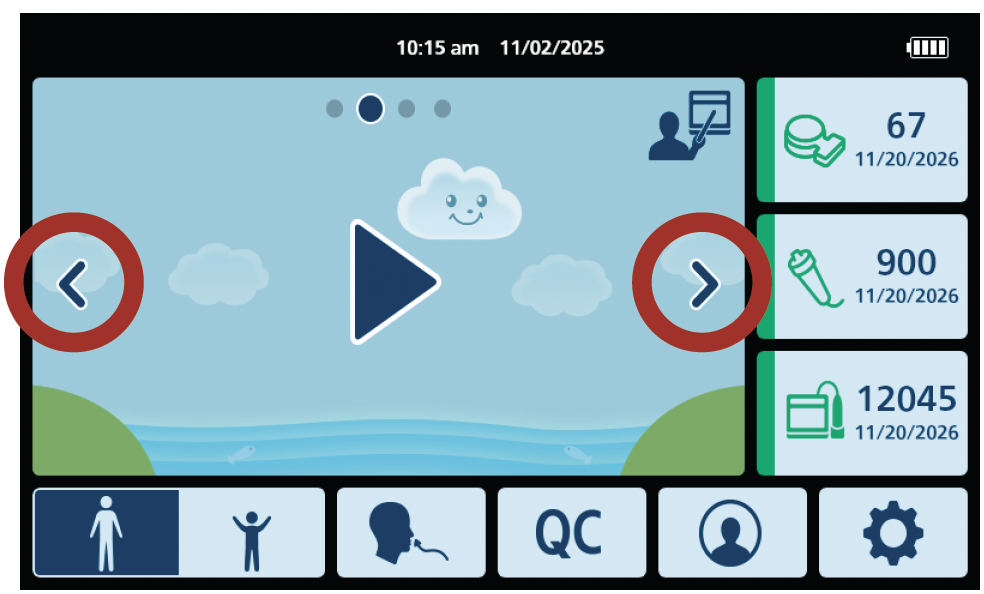
- When moving between animations the background will change.
- When ready, tap the play icon to start the test:

- NIOX PRO® can be operated with two different exhalation times, 10 seconds and 6 seconds. The 10 second test is the preferred mode. For children who are not able to perform the 10 second test, the 6 second test is an alternative.
- Change to 6s test mode by selecting the child icon in the bottom left of the home screen:
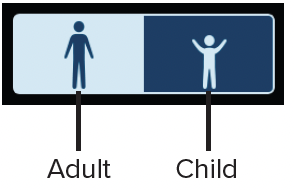
- The animation selection window will change to illustrate that the 6 second mode has been activated.
- When ready, tap the play icon to start the test.
Note: The device will revert to 10 seconds after each test. Verify that the device is in the desired mode before starting each test.
Completed this step?
Step three: Performing a test
- Pass the Breathing Handle to the patient.
- The patient should exhale fully to empty their lungs.
- Instruct the patient to place the Breathing Handle in their mouth, sealing their lips around it.
- The patient should then inhale deeply through the Patient Filter. On-screen animations will guide them.
- Once prompted, ask the patient to exhale steadily for the chosen 6 or 10-second duration.
- Click here to find out more about each animation.
- If pressure is incorrect, the animation will indicate it, and an audible alert will sound.
Completed this step?
Common questions
How do I start the test?
The test starts when the patient inhales or when you press "Start Measurement."
Can patient filters be reused?
No, use a new filter for each patient to avoid cross-contamination. Reuse the same filter only for multiple tests on the same patient during one visit.
How do I store unused filters?
Keep filters in their original box until needed.
How do I order more filters?
Contact your local sales representative via our online quote tool to order more filters.
Contact NIOX® Customer Services
Submit your details so that we can help you.
Support Checklist:
You've completed all the steps!

Track your progress.


NIOX® Customer Support and Training
At NIOX® we are passionate about providing excellent support and training.


References:
- Bonini M et al. The role of Fraction Exhaled Nitric Oxide (FeNO) in asthma management: an Italian consensus statement on clinical and economic aspects.
- Multidisciplinary Respiratory Medicine. 2025;20(2025):1-8.
- Czubaj-Kowal M et al. Relationship between air pollution and the concentration of nitric oxide in the exhaled air (feno) in 8–9-year-old school children in Krakow.
- International Journal of Environmental Research and Public Health. 2021;18(13):6690.
- Asthma and Lung UK. FeNO test. 2026. Available at; https://www.asthmaandlung.org.uk/symptoms-tests-treatments/tests/feno-test [Accessed April 2026].
- NHS England. Fractional exhaled nitric oxide (FeNO) [leaflet]. 2021. Available at; https://www.england.nhs.uk/aac/wp-content/uploads/sites/50/2021/08/fractional-exhaled-nitric-oxide-feno-patient-leaflet.pdf [Accessed April 2026].


